

How to Reset Password on VDS / VPS Server?
In this guide, we will explain step by step how you can reset the password of your VDS or VPS server using the Virtualizor panel.
Changing the server password; It is very useful when you have security problems, forget your current password, or want to create a new access password.
You can easily change your server password in a few minutes by following the steps below.
1. Step: Stopping the Server
The server must be turned off before starting the password changing process. For this, you need to stop your server via the Virtualizor panel.
After selecting the relevant server on the panel, click Stop.
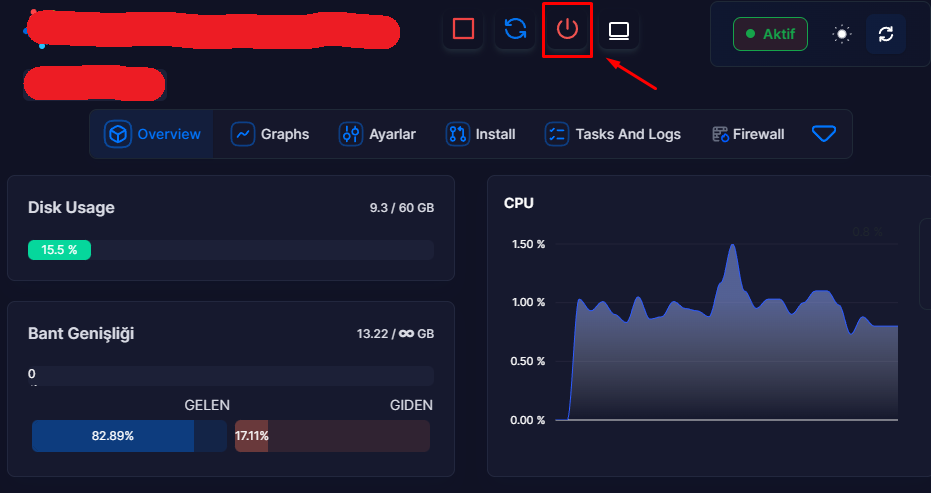
Once the server has stopped completely, you can move on to the next step.
2. Step: Changing Server Password
You can access the password change screen by following the menu path below in the server management panel:
Settings → Change Password
Then:
- Set a new strong password that you want to use
- Enter the password in the relevant field
- Click on the Change Password button
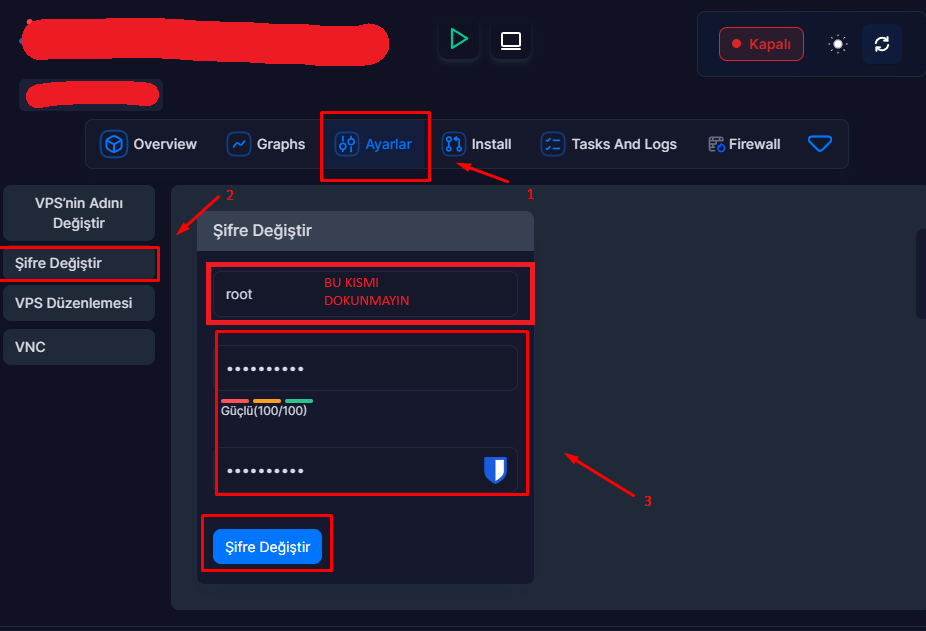
The password change process will be completed within a few seconds.
3. Step: Restarting the Server
Once the password is changed you will need to run your server again.
You can restart your server by clicking the Start button on the panel.

Once the server is opened, your new password will be activated.
Process Completed
After completing all the steps, the password of your VDS / VPS server will be changed successfully.**
Now:
- In SSH connections
- Remote Desktop (RDP) access
- or in server administration logins
You can log in to the server using the password you have newly determined.
For your security, it is recommended that you use a strong and unique password that is difficult to guess.